How to use TowerMaster
Build a real Sega Master System game — from an empty project to a bootable ROM and a boxed cartridge.
Contents
01Install
TowerMaster is a free, portable Windows (x64) app. Install it with winget:
winget install Silvatower.TowerMasterOr download the latest release,
unzip it anywhere, and run TowerMaster.exe. There's no installer and nothing to configure.
02Create a project
On the start screen choose New Project, give it a name and a folder, and pick a template (platformer, top-down adventure, shoot-'em-up, RPG, and more). Each template seeds a starter scene, tiles, sprites, and sensible subsystem settings so you have something playable from the first second — or pick Empty Project to start from a blank scene and turn subsystems on yourself.
A project is just a folder — project.json, your PNG assets, and the scenes. You can reopen it
anytime from the Recently opened list.
03The workspace
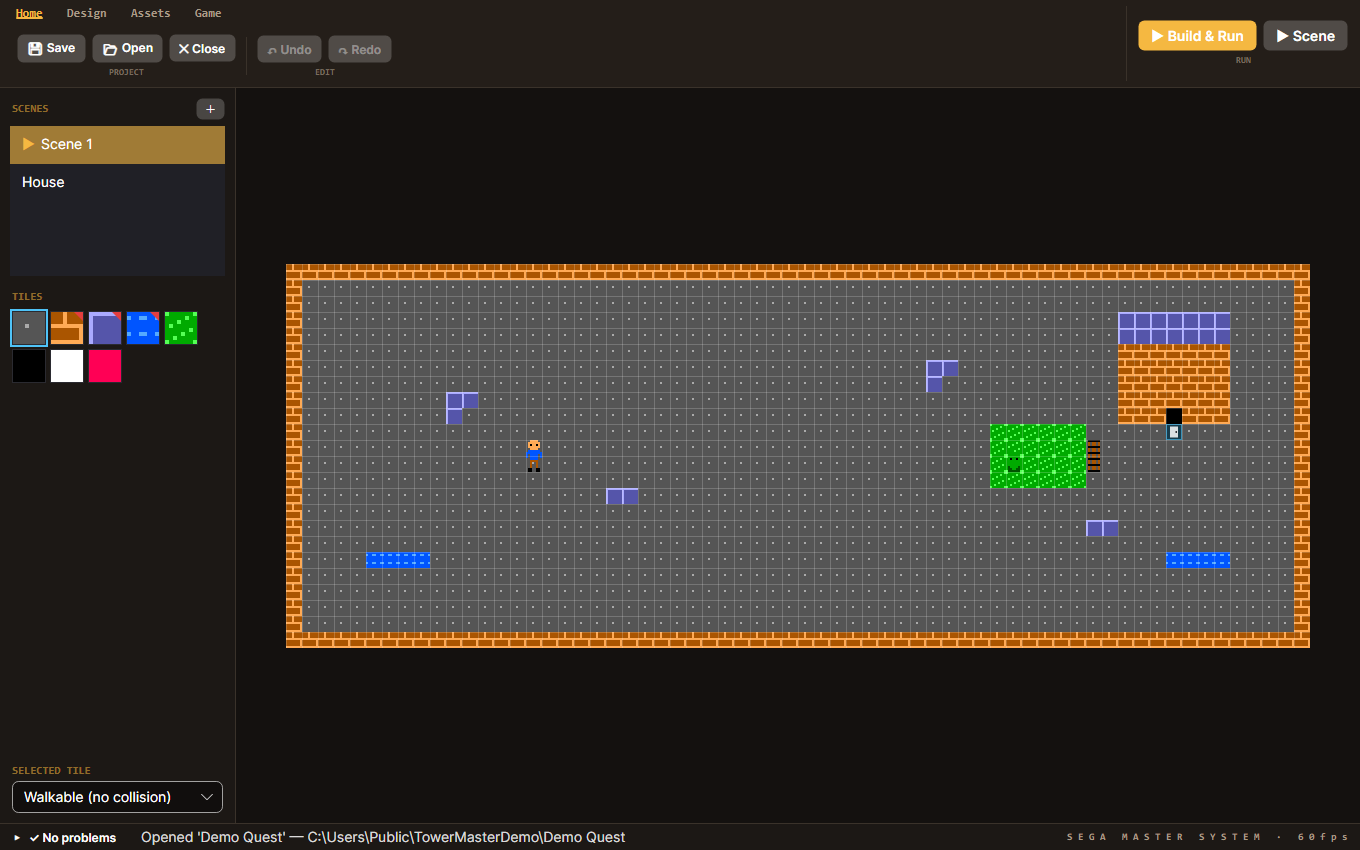
- Ribbon (top) — Home, Design, Assets, and Game tabs group every tool.
- Scenes (left) — every screen in your game; the ▶ marks the start scene. Add more with +.
- Tiles (left) — the current scene's tile palette; click one to paint with it.
- Canvas (center) — your level. Scroll to pan,
Ctrl+wheel to zoom. - Problems (bottom) — live warnings (missing start scene, an entity with no sprite, a dangling door…).
04Paint a scene
Pick a tile from the palette and click or drag on the canvas to paint. Each tile has a collision setting — shown in the Selected tile dropdown — so you decide what's floor, wall, or a one-way (jump-through) platform.
05Sprites & entities
Under the Assets tab you manage the game's sprites. Two ways to add one:
- Import any image — TowerMaster reduces its colors and fits it to the Master System's 8×16 sprite grid automatically (with optional dithering).
- Pick from the built-in library of original, CC0, hardware-ready sprites — categorized and ready to drop in.
Place sprites in a scene as entities (the player, enemies, pickups, doors). Select several at once to move, copy/paste, nudge, or delete them as a group.
06Behaviors
Behaviors are what make things do something — and you never write engine code for them. TowerMaster ships a hand-optimized Z80 game engine; you switch features on as data. Turn on things like:
- Side-scrolling platformer locomotion, jumping, stomps and one-way platforms
- Combat — melee, projectiles, enemy waves, bosses
- RPG systems — HP/XP, leveling, items, battles, dialogue
- Shoot-'em-up scrolling, moving platforms, and more
The Game tab exposes higher-level settings: the control scheme (Controls…), the character roster, HUD and audio — and Features…, where you toggle subsystems on or off (platformer extras, shoot-'em-up, boss, RPG leveling, battery save) at any time, not just at creation. Conflicting options disable each other so you can't build an impossible combination.
07Doors & multi-scene games
Place a door on a tile, point it at a target scene and an arrival spot, and TowerMaster stitches your scenes into one game — every scene reachable through a door is compiled into the ROM. This is how you build towns, dungeons, and connected worlds.
08Play it
Hit ▶ Build & Run and your game boots instantly in the built-in Sega Master System emulator (a from-scratch Z80 + VDP + PSG/FM implementation). Use ▶ Scene to launch straight into the scene you're editing, so you can test a level without playing from the start.
09Export a ROM
The same build produces a real, bootable .sms ROM — the exact bytes that run on original
hardware and every accurate emulator. TowerMaster enforces the console's real limits as you go, so what
builds, runs.
10Make it physical
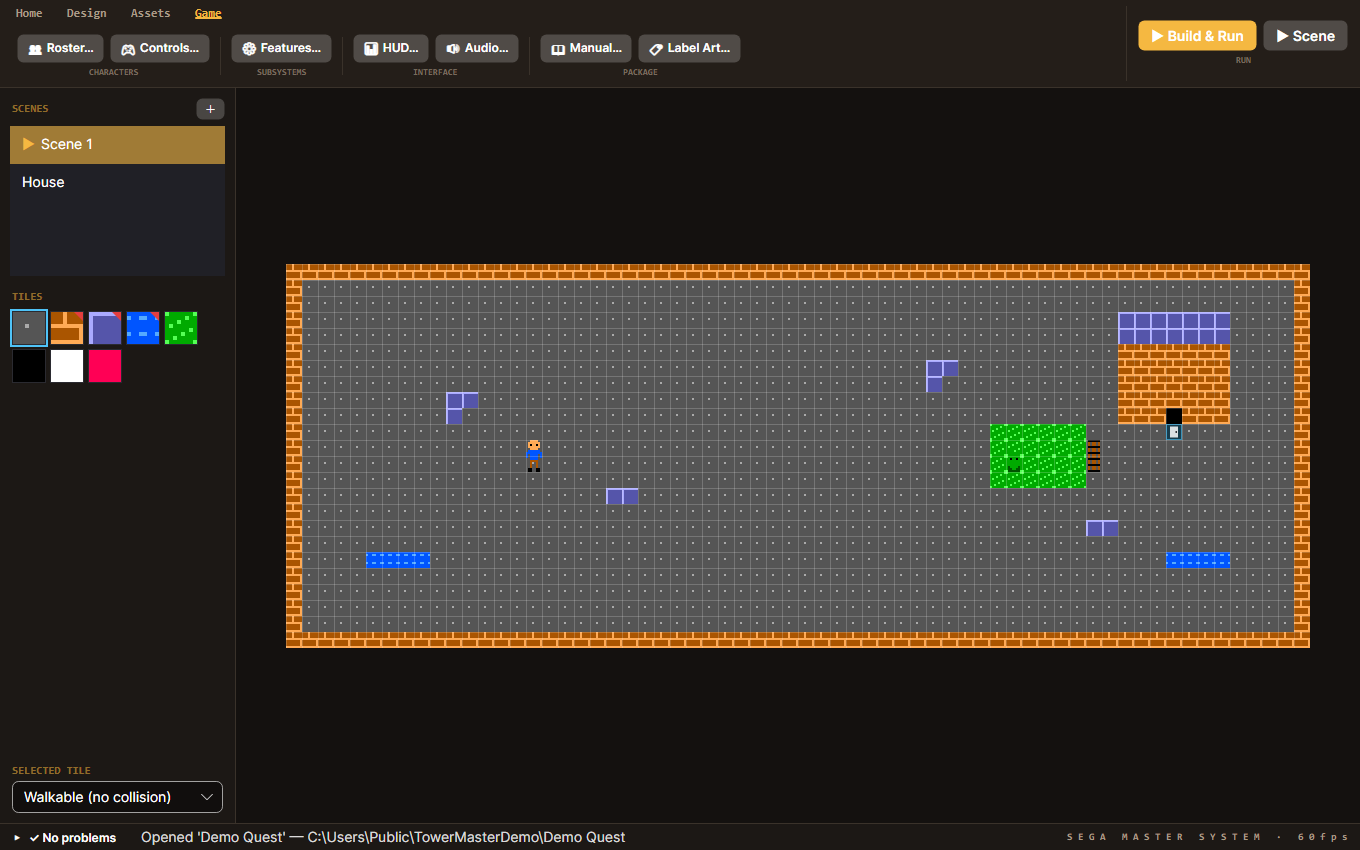
The goal is a real cartridge in a box. From the Game → Package group:
- Manual… generates a printable instruction manual (with your game's controls, characters and story).
- Label Art… generates a printable cartridge label and box front, sized with cut marks.
Print those, flash the .sms to a cartridge, and you've made a real Master System game.